

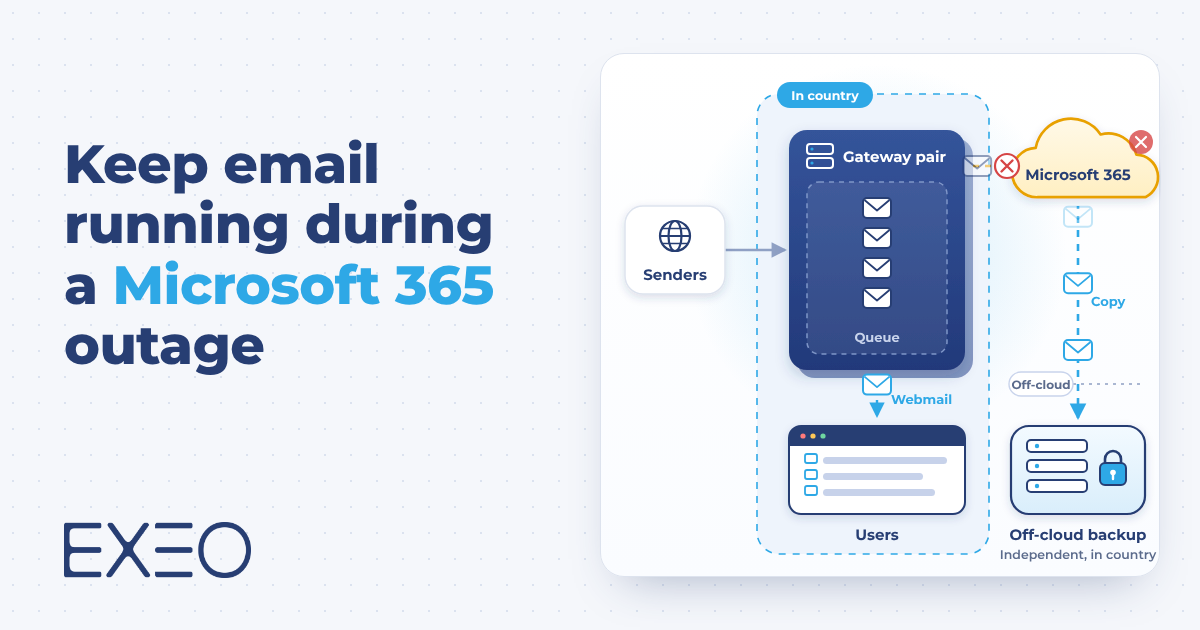
A Microsoft 365 outage stops mail for every user at once. Microsoft’s terms set availability targets and service credits, and leave continuity to the customer. This post sets out what those documents say, a three-step design for email continuity that includes sign-in, and the checks to make when your data must stay in the country.
Email is a dependency you do not control
When Microsoft 365 goes down, nothing in your own infrastructure can bring mail back. Outages are rare and usually short. Their cost lands on you: approvals that wait, customers who get no reply, and a mailbox history you cannot open.
What Microsoft's terms say about outages
Microsoft’s consumer terms state that online services suffer occasional disruptions and outages, that Microsoft is not liable for the loss you suffer as a result, and that during an outage you may be unable to retrieve your content. Its advice is to “regularly backup Your Content and Data” (Microsoft Services Agreement, section 6.b, version effective 30 September 2026).
That agreement governs consumer services. When you sign in with a work or school account, your organisation’s own agreements apply, and they point the same way. Microsoft’s shared responsibility documentation states that you own your data and identities in every cloud model, software as a service included. The Product Terms for Online Services refer to the Data Protection Addendum for how Microsoft processes and secures Customer Data. Availability falls under the Service Level Agreement for Microsoft Online Services, whose remedy for downtime is a service credit on your bill: 25% when monthly uptime drops below 99.9%, 50% below 99%, and 100% below 95% (Microsoft Learn, service level agreements).
A 99.9% monthly target leaves room for about 43 minutes of downtime in a 30-day month before any credit applies. Credits reduce a bill. They do not restore mail flow or cover the cost of a missed day.
These documents lead to the same conclusion. Microsoft commits to availability targets and credits, and keeping your own mail moving during an outage is a design decision that stays with you.
What a Microsoft 365 outage takes away
An outage removes three things, and each needs its own protection.
- Mail flow. Inbound mail waits at the sender’s server and may be returned if the outage runs long. Outbound mail stops.
- Working state. Mailbox history, calendars and contacts become unreachable, even for mail that arrived safely.
- Sign-in. A failure in the identity service can lock users out while mail is still being accepted.
A backup helps after the event, because it lets you restore deleted or damaged data. It does not keep people working during the event. Continuity needs a path for mail and a place for users to work that do not depend on the failing service.
Step 1: a gateway pair and an independent Microsoft 365 backup
The first step protects mail flow and your data without changing how users work day to day.
- Two mail gateways, hosted in-country, as your MX records. All inbound mail reaches them first. They filter it and relay it to Exchange Online. If Exchange Online stops accepting mail, the gateways queue it, so senders see no bounce.
- An email continuity feature on the gateways. It keeps a rolling store of recent inbound mail, with a retention period you set. During an outage, users open a separate webmail to read that mail and to send new messages.
- A locked connector. Exchange Online accepts mail only from the gateways, so nothing bypasses the filtering.
- An independent backup of the tenant. It sits in a separate in-country location and covers deletion, ransomware and tenant compromise.
This step has clear limits. Users get recent inbound mail and the ability to send and receive. Calendars, contacts and the full mailbox history stay in Microsoft until the service returns. The webmail also needs a way to sign users in without Microsoft, which Step 2 covers.
Switch Microsoft to outage. Inbound mail queues at the gateways, and the continuity store keeps a copy of recent mail for emergency webmail. Untick continuity to see the difference.
Step 1 runbook
- Outage detected
- Gateways queue inbound mail
- Users open the continuity webmail
- Users read recent mail and send new messages
- Microsoft service restored
- Check the queue and close the incident
Illustrative simulation. Timings are not measurements.
Step 2: independent identity
A full Microsoft 365 failure can include Entra ID, the service behind every sign-in. This step makes sure users can still authenticate when it is down, for the gateway webmail in Step 1 and the standby Exchange in Step 3.
- A local directory as the source of truth. Users are synchronised from on-premises Active Directory, which keeps working without Microsoft. Cloud-only accounts have no local copy, so they are created or synchronised in advance.
- Passwords that match. A password changed in the cloud must reach the local directory. Password writeback does this, and Microsoft documents it as requiring Entra ID P1, P2 or Microsoft 365 Business Premium. The alternative is to allow password changes only on-premises and synchronise them one way to Microsoft.
- Gateway webmail on the local directory. Configure the continuity webmail to authenticate against your directory over LDAP. Single sign-on through Entra would fail in this scenario. Check your gateway’s documentation: FortiMail, for example, supports LDAP and SAML sign-in for webmail, and can cache user passwords so sign-in still works during an LDAP server outage.
- Administration outside Entra. Administrator access to the gateways, DNS and the standby does not depend on Entra, and documented break-glass accounts exist.
- A plan for MFA and conditional access. Entra policies are not available during the outage, so agree in advance which local control replaces them.
- A regular export of the tenant configuration. Users, groups and conditional access policies are exported, so you can rebuild if you must. There is no second Entra tenant to fail over to.
This step keeps people able to sign in. It gives them nothing to read on its own, which is the role of Step 3.
Step 3: a standby mailbox service
The third step keeps users working in their own mailbox when Microsoft is unavailable. It builds on the identity step and adds a standby Exchange server in-country, fed three ways:
- Dual delivery. The gateways deliver every inbound message to Exchange Online and to the standby, so new mail is present on both within seconds.
- Journaling. Internal and sent mail is copied to the standby as well.
- Scheduled sync. A sync tool copies calendars, contacts and folder changes on a fixed interval.
The standby signs users in against the local directory from Step 2, so it keeps working if Microsoft’s identity service is down. Failover is a routing change on the gateways and a DNS change for Outlook and mobile devices. Failback needs a reverse sync, so changes made on the standby return to Exchange Online.
The standby is close to the primary and never identical. Calendar and contact changes made after the last sync are missing until failback. The interval you choose sets that gap, and the worst case equals the interval. Teams, SharePoint and OneDrive are outside this design.
This is the standby service of step 3. It signs users in against the local directory from step 2. Pick the type of outage, then run the failover and failback. Move the sliders to see what a sync interval leaves behind.
Gap between primary and standby
New mail reaches both servers within seconds. Calendar entries, contacts, folder moves and read state arrive with the next delta sync.
Failover runbook
- Outage detected, decision to fail over
- Gateway routes mail to the standby
- Autodiscover and webmail DNS point to the standby
- Users reconnect Outlook and mobile devices
- Service runs on the standby
- Microsoft service restored
- Reverse sync from standby to Exchange Online
- Routing and DNS return to Exchange Online
- Verify mailboxes and close the incident
Illustrative simulation. Timings are not measurements.
| Step 1: gateways and backup | Step 2: independent identity | Step 3: standby service | |
|---|---|---|---|
| Users during an outage | Recent inbound mail, send and receive | Sign-in through the local directory | Full mailbox as of the last sync |
| What is missing | Calendars, contacts, full history | Any mailbox content, on its own | Calendar and contact changes since the last sync |
| Main effort | MX change, connector lock, backup policy | Directory sync, password handling, break-glass accounts, MFA plan | Server build, sync tooling, failover tests |
| Added cost | Gateway licences, backup storage | Directory capacity, and licences if you use password writeback | Server licences, hosting, sync tool, storage |
Keeping data in the country
A continuity design can break a residency rule if any copy of the mail sits outside the country. Check each component:
- Gateway queue and continuity store. Are they on your own in-country nodes or in the vendor’s cloud, and in which country?
- Backup. Where is it stored and processed, and who can administer it?
- Standby service. Where does it run, and who holds administrative access?
- Scope of the rule. Does it cover mail in transit and in a queue, as well as stored data? Your compliance team should confirm the exact wording, because health, financial and government data often carry extra rules.
Also avoid placing the standby in the same cloud provider as the primary. A shared failure would take both down.
Plan for the next outage
EXEO helps organisations with data residency requirements design and run email continuity. Talk to us for a second opinion on your current setup.
🔒 100% Confidential. No obligation.
Sources
- Microsoft Services Agreement, section 6.b, version effective 30 September 2026
- Microsoft Learn, Shared responsibility in the cloud
- Microsoft Product Terms for Online Services
- Microsoft Data Protection Addendum
- Microsoft Learn, Explain service level agreement concepts
- Microsoft Learn, Licensing requirements for Entra self-service password reset
- Fortinet, FortiMail Administration Guide: Configuring licensed features (email continuity)
- Fortinet, FortiMail Administration Guide: Configuring single sign-on (SSO)
- Mimecast Support, Continuity overview
- Mimecast Support, Continuity events
Frequently Asked Questions
Does Microsoft back up my Microsoft 365 data?
Microsoft runs the service and commits to availability targets. Its shared responsibility documentation states that you own your data and identities in every cloud model, so an independent backup is a customer decision.
What does the Microsoft 365 SLA cover?
The Service Level Agreement for Microsoft Online Services covers availability. When monthly uptime drops below 99.9%, the remedy is a service credit of 25% of the bill, rising to 50% below 99% and 100% below 95%. Credits do not restore mail flow.
What happens to inbound mail during a Microsoft 365 outage?
Sending servers keep retrying for a while and may return the message if the outage runs long. With in-country gateways set as your MX records, the gateways accept and queue the mail, so senders see no bounce.
What is the difference between a backup and email continuity?
A backup restores data after deletion, ransomware or tenant compromise. Email continuity keeps people sending and receiving while the primary service is down. A resilient design needs both.
What do users get during an outage with step 1?
Users read recent inbound mail and send new messages through a separate webmail. Calendars, contacts and the full mailbox history stay in Microsoft until the service returns.
What does a standby Exchange server add?
Users work in their own mailbox as of the last sync, and sign in against the local directory. The standby is close to the primary and never identical: changes made after the last sync are missing until failback, and the sync interval sets that gap. Teams, SharePoint and OneDrive are outside this design.
How do we keep a continuity design compliant with data residency rules?
Check where each component runs: the gateway queue and continuity store, the backup, and the standby, along with who holds administrative access. Ask your compliance team to confirm whether the rule covers mail in transit and in a queue, as well as stored data.
How do users sign in if Entra ID is down?
Users sign in against the local directory instead of Entra ID, as long as their accounts exist there. Accounts synchronised from on-premises Active Directory do. Cloud-only accounts need to be created or synchronised in advance. A password changed in the cloud reaches the local directory only with password writeback, which Microsoft documents as requiring Entra ID P1, P2 or Microsoft 365 Business Premium, or when password changes are made on-premises. Plan for MFA and break-glass accounts too.